
Download PC 9 Virtual Metronome – virtual metronome, free metronome, music practice tool, rhythm training, beat counter, tempo tuner, practice metronome, music software, metronome for musicians, digital metronome, music practice app
Overview
PC 9 Virtual Metronome es una herramienta dedicada al entrenamiento rítmico diseñada para músicos que practican en PC con Windows. Construida con precisión en mente, aprovecha el chip de sonido interno de la computadora para ofrecer un timing de latidos exacto, convirtiéndose en un compañero fiable para sesiones de práctica consistentes. La aplicación funciona como un metrónomo digital que ayuda a los usuarios a mantener un tempo constante en varios ejercicios musicales, desde ejercicios para principiantes hasta desafíos rítmicos avanzados. Su propósito principal es apoyar a los músicos en el desarrollo del timing interno, mejorar la coordinación de conjunto y dominar compases complejos.
Los usuarios objetivo incluyen estudiantes, profesores y músicos profesionales que requieren un metrónomo fiable para la práctica diaria. Ya sea trabajando en escalas, lectura a primera vista o aprendiendo nuevas composiciones, la aplicación proporciona un punto de referencia auditivo y visual constante. El software es particularmente útil para quienes exploran música de géneros diversos, incluidos clásico, jazz y contemporáneo, donde la precisión rítmica es esencial. Aunque el desarrollador, PC 9, no ha proporcionado detalles adicionales, la longevidad de la aplicación desde su lanzamiento en 2012 sugiere un diseño estable y funcional.
Los casos de uso del mundo real incluyen practicar con partituras, grabar pistas de audio con timing constante y prepararse para presentaciones en vivo. En el ecosistema más amplio del software musical, PC 9 Virtual Metronome llena un nicho para herramientas rítmicas ligeras y sin adornos que priorizan la precisión sobre funciones llamativas. Su disponibilidad gratuita lo hace accesible a una amplia audiencia, especialmente estudiantes y aficionados que buscan una referencia de tempo fiable sin costo.
Key Features & Functionality
- High Accuracy Sound Chip Timing: The app uses the quartz crystal of the PC’s sound chip to ensure precise beat intervals, minimizing drift and maintaining consistent tempo throughout long practice sessions.
- Four Distinct Metronome Sounds: Users can select from two digital waveforms, a mechanical metronome click, and an acoustic hi-hat sample, allowing customization based on instrument or practice preference.
- Adjustable Tempo Range (40–240 BPM): The tempo can be fine-tuned using a slider or adjusted in single BPM increments, offering both speed and precision for varied practice needs.
- Tap-to-Set Tempo Functionality: A convenient 'Tap' button or keyboard input allows users to set tempo by tapping in rhythm, ideal for matching live playing or improvisation.
- Support for Multiple Time Signatures: The app accommodates time signatures from 4/4 and 3/4 up to 9/4, enabling advanced rhythmic exploration and training for complex compositions.
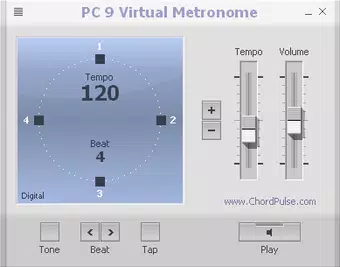
- Large Visual Beat Display: A prominent visual indicator shows each beat, serving as a supplementary cue for musicians who benefit from both auditory and visual feedback during practice.
For example, a pianist working on a piece in 7/8 time can use the app to set the correct time signature and visualize each beat while listening to the selected hi-hat sound. A guitarist learning syncopated rhythms might use the mechanical metronome sound to simulate a traditional practice environment. The ability to adjust tempo with precision supports gradual tempo increases, a common technique in skill-building.
Interface, UX & Performance
The user interface of PC 9 Virtual Metronome is designed with simplicity and functionality in mind. The layout centers around a large, clear display that highlights each beat, ensuring visibility even during extended use. Controls are straightforward, with clearly labeled elements for tempo adjustment, sound selection, and time signature input. Navigation is intuitive, requiring minimal learning curve, which benefits users of all experience levels.
Visual feedback is immediate and consistent, with the beat display updating in real time. The app’s responsiveness appears reliable, though the developer did not list formal performance metrics. The lightweight file size of 2.4 MB suggests efficient resource usage, likely resulting in minimal impact on system performance. Although the developer did not specify minimum OS requirements, the app has been available since 2012, indicating compatibility with a broad range of Windows versions.
Stability appears to be a strength, as the software has remained in use for over a decade without reported issues. The absence of advertisements or in-app purchases further contributes to a focused, distraction-free experience. While the interface lacks modern design elements such as animations or dark mode, its clean, functional layout supports its core purpose without unnecessary complexity.
Platform Compatibility & Technical Requirements
PC 9 Virtual Metronome is designed exclusively for Windows platforms. The app’s file size is 2.4 MB, making it a lightweight download suitable for systems with limited storage. It is available as a free download, requiring no purchase or subscription. The software version is listed as 1.0, and the release date is August 9, 2012.
The developer did not specify minimum OS requirements or compatibility details beyond the platform. However, given its release date and small footprint, it is likely compatible with older Windows versions such as Windows 7, 8, and 10. Users on newer systems, including Windows 11, may still be able to run the app, though compatibility is not guaranteed without further testing. No additional permissions or system access are required beyond standard audio output.
Pros and Cons
Pros
- Free to download and use with no ads or in-app purchases
- High tempo accuracy using the PC’s sound chip
- Support for multiple time signatures up to 9/4
- Four distinct sound options for varied practice environments
- Simple, intuitive interface suitable for all skill levels
- Lightweight size (2.4 MB) ensures minimal system impact
Cons
- Platform limited to Windows only
- No official update since 2012; may lack modern OS compatibility
- Interface lacks modern visual enhancements like dark mode
- Developer did not provide technical specifications or system requirements
- No mobile or cross-platform availability
FAQ
Is PC 9 Virtual Metronome safe to download?
Yes, the app is free and available from trusted sources. It does not require installation of third-party software or system modifications.
Can I use this metronome on Windows 11?
While the developer did not confirm compatibility, the app’s lightweight design and long-standing presence suggest it may work on Windows 11. Users are advised to test it in a safe environment.
Does the app support custom time signatures beyond 9/4?
The app supports time signatures up to 9 beats per bar, but no information is available on whether it allows user-defined signatures.
Is there a mobile version of this app?
Currently, PC 9 Virtual Metronome is only available for Windows. There is no official mobile version for Android or iOS.
How do I set the tempo using the tap function?
Users can tap the 'Tap' button or press any key on the keyboard in rhythm with the desired tempo. The app will calculate and set the BPM accordingly.
Final Thoughts
PC 9 Virtual Metronome remains a solid choice for musicians seeking a no-frills, highly accurate rhythm tool on Windows. Its core strengths—precision timing, multiple sound options, and support for complex time signatures—make it a valuable asset for both beginners and advanced players. While the interface and update history reflect its age, the app’s reliability and free status continue to offer strong value.
For students, teachers, and hobbyists focused on rhythmic development, this tool provides consistent feedback without distractions. Its minimal system requirements and straightforward design ensure it runs smoothly on older hardware. Despite its lack of modern features, its functional integrity and long-standing use affirm its utility in the music practice toolkit.
Download PC 9 Virtual Metronome now


